




Aller au contenu
View in the app

A better way to browse. Learn more.

Forums Enseignants du primaire

A full-screen app on your home screen with push notifications, badges and more.

To install this app on iOS and iPadOS
  1. Tap the Share icon in Safari
  2. Scroll the menu and tap Add to Home Screen.
  3. Tap Add in the top-right corner.
To install this app on Android
  1. Tap the 3-dot menu (⋮) in the top-right corner of the browser.
  2. Tap Add to Home screen or Install app.
  3. Confirm by tapping Install.

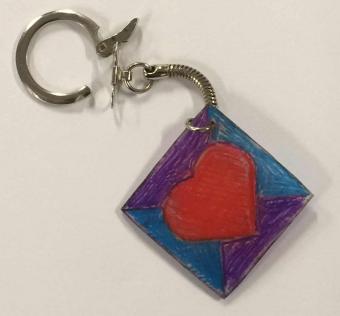
Porte-clef Plastique dingue

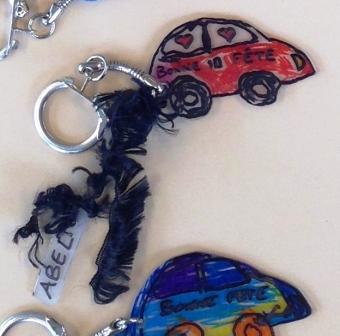
Porte-clef pour la fête des pères, réalisé avec du "plastique dingue" :
- on découpe la forme dans le plastique dingue et on n'oublie pas de faire un trou (avec un perforateur).
- on demande aux élèves de la colorier.
- on la met au four et on attend que le plastique rétrécisse et devienne plat (s'il ne devient pas plat, je le retourne avec une fourchette et j'aplatis un peu).
- j'utilise deux pinces pour placer la partie métallique.

Droit d’auteur

© EDP
  • From the category:

    Fête des pères

    · 67 images

    Account

    Navigation

    Rechercher

    Rechercher

    Configure browser push notifications

    Chrome (Android)
    1. Tap the lock icon next to the address bar.
    2. Tap Permissions → Notifications.
    3. Adjust your preference.
    Chrome (Desktop)
    1. Click the padlock icon in the address bar.
    2. Select Site settings.
    3. Find Notifications and adjust your preference.